



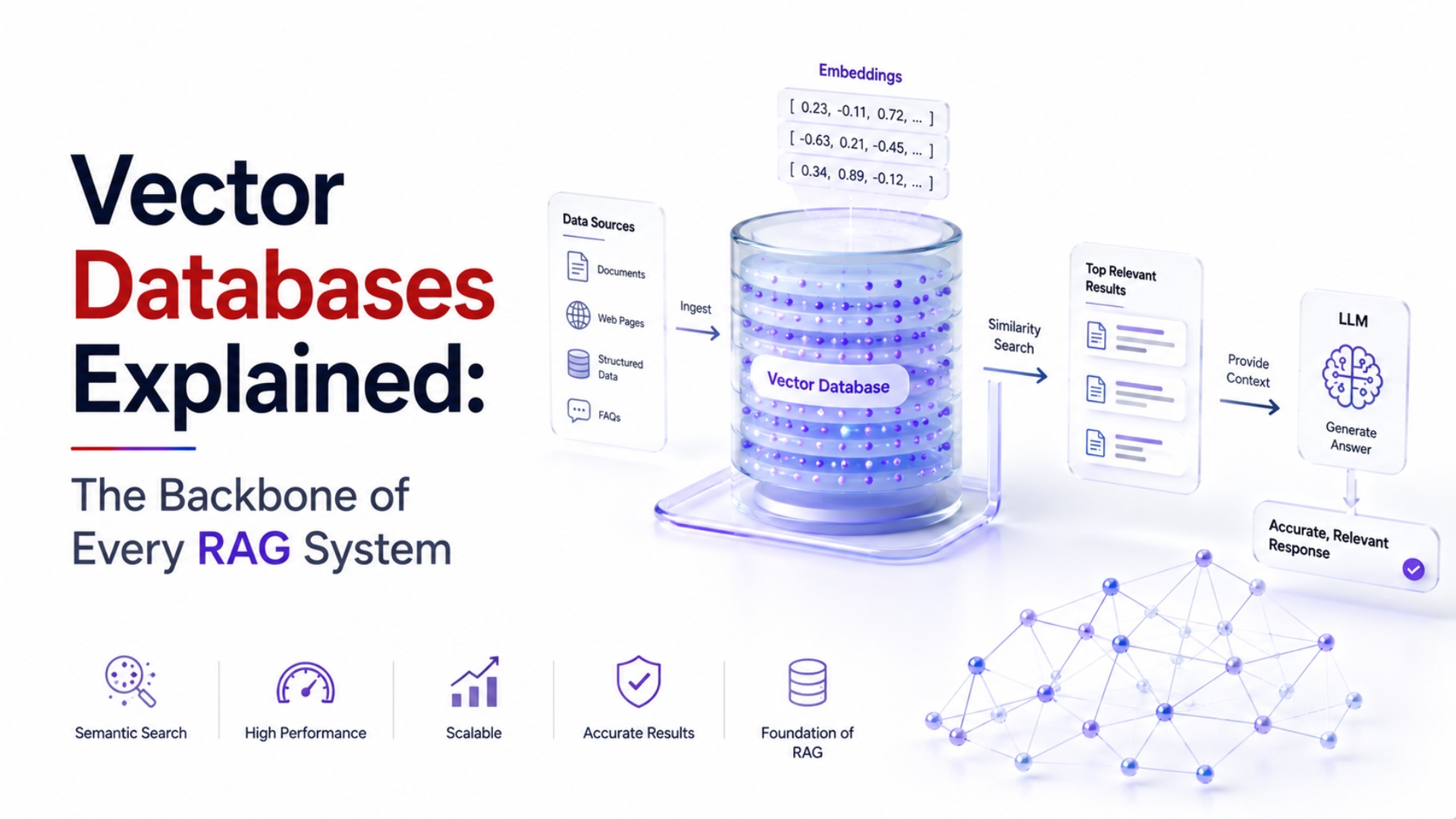
Vector Databases Explained: The Backbone of Every RAG System
Every RAG (Retrieval-Augmented Generation) application you've heard about — a chatbot that answers questions from a company's internal documents, an AI assistant that searches your notes — relies on a piece of infrastructure most explanations skip over entirely: the vector database. Here's what it actually does and why it matters.
The Problem Vector Databases Solve
Traditional databases are built for exact or structured matches — find the row where customer_id = 1042. But "find the paragraphs most relevant to this question" isn't a structured match problem; it's a meaning match problem. A regular database has no concept of which pieces of text are semantically similar to a query, only which fields match exactly.
Vector databases solve this by storing embeddings — numerical representations of text (or images, audio) generated by an AI model, where semantically similar content ends up mathematically close together in that numerical space. When a user asks a question, the system converts the question into the same kind of embedding, then searches for the stored embeddings closest to it — this is similarity search, and it's the mechanism that lets an AI system retrieve genuinely relevant context rather than just keyword matches.
Why This Matters for RAG Specifically
Our companion post, What Is RAG? A Complete Beginner's Guide, covers the full retrieval-augmented generation pattern — vector databases are the retrieval half of that equation. Without one, an LLM only knows what it learned during training; with one, it can pull in current, private, or domain-specific information at the moment a question is asked, without needing to be retrained.
This is precisely why vector databases have become standard infrastructure in enterprise AI deployments — a company's internal documentation, product catalogue, or support ticket history can be made queryable by an LLM without ever exposing that data during model training itself, which also has real data-governance advantages.
Popular Vector Database Options
The field has moved fast, and different tools suit different scales:
ChromaDB — lightweight, popular for prototyping and smaller-scale RAG applications
FAISS (Facebook AI Similarity Search) — a widely used open-source library, strong for local or self-hosted setups
Pinecone, Weaviate, Milvus — managed or self-hosted options built for production-scale deployment
Oracle 23ai's built-in vector search — notable because it lets enterprises run vector search directly inside their existing Oracle database infrastructure, rather than standing up a separate system
Where to Actually Learn This Hands-On
This isn't a concept best learned purely in the abstract — Technovalley's GAIE program includes hands-on work with vector databases as part of building deployed LLM applications, while the OCI Generative AI Professional program covers the same concepts specifically through Oracle Database 23ai's native vector search capability. The One Year Post Graduate Program in Generative AI Applications goes deepest, working directly with ChromaDB as part of its curriculum.
FAQs
Do I need a vector database for every AI project? No — only when you need semantic search or retrieval over a body of text/documents. Simple chatbot or generation tasks without a knowledge base don't require one.
How is a vector database different from a regular search engine? Traditional search (like Elasticsearch's keyword matching) looks for literal term overlap; vector search finds conceptually similar content even when the exact wording differs entirely.
Is learning vector databases hard if I'm not a database expert? No — most vector database tools are designed with simple APIs specifically so application developers, not database administrators, can use them without deep database internals knowledge.
Learn to build real RAG systems with vector databases hands-on. Explore the GAIE program or browse all Generative AI programs.